|
Create ISO Image File from your DVD using Windows: |
- As of 7/24/20, we recommend downloading the FREE IMGBurn software which will let you make an .ISO file from your DVD.
- It has been tested by us and we know it is safe and virus free.
- The official IMGBurn download site is located here https://www.imgburn.com/index.php?act=download
- You may also download the version we've used directly from TrepStar here: IMGBurn Software
- Install IMGBurn on your Windows computer.
- Place your source working and tested DVD in your windows computer CD/DVD drive.
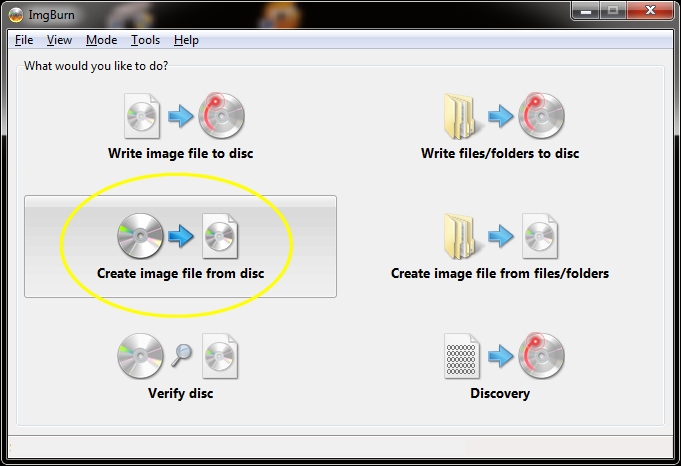
- Open IMGBurn and choose 'Create image file from disc'
- Choose the DVD drive on your computer that contains your DVD and set the destination file name of the .ISO file you are about to create.
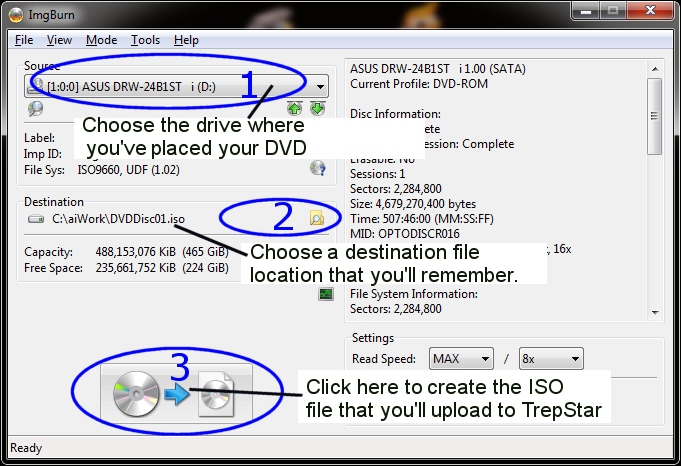
- When finished, Logon to TrepStar and click the link to configure your product.
- In the 'DVD Data File' section of the TrepStar project, click the upload button for the data file and pick the ISO file you just created. This will upload that ISO file to the TrepStar server and your project will be ready to order as soon as it's approved by the TrepStar staff.
|
Create ISO Image File from Mac: | ||
|
||