DVD Authoring Service:
What is DVD Authoring?
To create a Video DVD that plays in a regular DVD player, you need some software that converts your raw video clips into titles, chapters, and menus, using a specific file structure that a DVD player can understand. We provide professional dvd menu creation for our customers.
When Would I Need DVD Authoring?
If you want your video clips to play in a standard DVD or Bluray player, you need DVD authoring software as opposed to just burning raw video files (.mov, .avi, .mp4) to a data DVD (which will only play in a computer or modern device).
DVD Authoring Service.
If you have your finished video clips (e.g. .mov, .avi, .mp4), we offer our DVD menu creating & authoring service. See a Recent Example
TrepStar does not offer blu-ray authoring or duplication services.
DVD Authoring Package Menu Choices:
Option #1 $150
Choose between having a basic menu or auto play: [See Examples]- 1) No Menu with auto-play. The DVD will be set to auto-play so it starts to play when inserted.
- 2) Basic single menu with just a "Play" or "Play All" choice.
Option #2 $250
Your DVD may have a more complicated menu: [See Examples]- Single menu with "Play ALL" and individual chapters listed on the main menu.
Option #3 $350
Your DVD may have a menu and sub-menu with scenes: [See Examples]- Two part menu with "Play All", and "Scenes" choice. Choosing "Scenes" brings up the second sub menu. The wording can be changed (chapters or chapter selection or menu or whatever name you choose).
Limits:
- TrepStar does not offer more complicated menu systems beyond option #3
- TrepStar does not offer closed captioning. This is prone to error and takes a lot of time to test properly so it is cost prohibitive.
DVD Authoring Options:
- Choose whether the DVD will auto-play or not. By default, we set DVDs to auto-play which is what most people want. Auto-play means the DVD will start playing when put in a computer or DVD player unless that device has auto play turned off.
- Up to 9 chapters. We can split your video clips (e.g. .mov, .avi, .mp4) into several chapters, or combine short clips into a single chapters. Any more than 9 chapters makes the menu too complicated unless it becomes just a simple text list. If you want more than 9 chapters, each extra chapter costs $25.00 each and the chapter list will be a simple text list on one menu.
- We can take any artwork you have for the background or menu system. Just send some HD .jpg images and we'll try to cut/paste them into a menu.
- If you don't have specific artwork already made for the menu system, we can take a screen grab from your video (which is most common).
- We can adjust the font and color of the menu text.
- Total play time up to two hours (120 minutes or so). We author single layer DVD-5 4.7GB DVDs. Basically, this means it's usually no more than 120 minutes long for all content included on the disc. Menus and artwork take away from total play time because they are stored on the DVD as well so the total playtime can change based on that.
- We will author the DVD, give you a link to an ISO file that you download to make sure it's what you want. Your computer can play an .iso file. We'll show you how.
- We will make a few adjustments (iterations) if you see any problems or issues with the authored DVD ISO proof. If we have to keep going back and forth with changes, that really adds a lot of time, but usually, we get it right after the first or second try. If you want more than two iterations in the design phase, we charge $150.00 per hour for that extra work (we'll let you know before we bill you). It takes about an hour to redo the video so each change is roughly an extra hour.
- Once it's done, you'll have a free TrepStar DVD project in case you want us to manufacture and ship DVDs to you or your customers. You don't have to use TrepStar to publish your DVD. We just offer manufacturing and fulfillment service if you want it.
- Of course you also get the final DVD .ISO file that you can use to create your own DVDs.
- This price is for either an NTSC or a PAL version (see more on this below). If you need both, it costs $75.00 extra per disc.
- If you're interested, send us an email with some of the details.
More on DVD Authoring & Menu Creating
Once you have your video content created and edited, if you want to make it playable in a DVD player, you must convert it to DVD Video format using DVD authoring software.
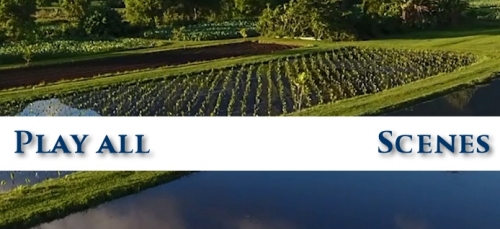 As you know, a DVD often has menus, and sub-menus with buttons such as play movie, scene selection, deleted scenes and so forth.
Creating these menus, background art, buttons, and other artwork are part of the DVD authoring process.
As you know, a DVD often has menus, and sub-menus with buttons such as play movie, scene selection, deleted scenes and so forth.
Creating these menus, background art, buttons, and other artwork are part of the DVD authoring process.
Even if you just want your clips to play with no menu, you still must author the DVD. The process of DVD authoring combines your video clips with artwork, menus, chapter points, text, and possibly animation, music, and more. DVD authoring is the final step after you've created your videos. Once complete, the video DVD may be viewed on a DVD player, bluray player, game system, or computer.
A video/movie DVD playable in a standard DVD player has a specific file structure and screen resolution.
NTSC DVD Player vs. PAL DVD Player Formats
DVD players are designed to read DVDs authored in one of two formats. They are:
- NTSC: North America and others: USA / Canada / Mexico / Japan / Sourth Korea / Central America etc. More Info
- PAL: Europe and others: UK / Most of EU / Australia / Argentina / Brazil / China / India etc. More Info
The main differences are frames per second and scan lines. This depends on the country where the DVD player is located and how those TVs are designed.
- When authoring the DVD, it can be produced as a NTSC DVD or PAL DVD which have different resolutions and frame rates. This is set within the authoring software.
- TrepStar authored DVDs are region free, but you still have to choose between NTSC format DVD or PAL format DVD.
- Computers can read and play both NTSC and PAL DVDs.
- DVD players in North America and others: USA / Canada / Mexico / Japan / Sourth Korea / Central America play NTSC DVDs and often have trouble playing PAL DVDs even if they are supposed to be region free players.
- Most of the rest of the world can play PAL DVDs and those players often have no trouble playing region free NTSC DVDs too. So if you need to choose, pick NTSC if you can't do both.
- Since some PAL DVD players will have trouble with NTSC, you need to decide if you want to author both an NTSC and a PAL version.
- Most NTSC DVD players do NOT play PAL DVDs well.
- If you're not sure, author a region free NTSC version which plays in USA / Canada / Mexico / Japan / Sourth Korea / Central America, and often will play fine in other countries PAL DVD players. There are no guarantees with that however.
The reason there are two formats is because TV technology evolved differently in different parts of the world. TVs in North America and Japan have different resolution than TVs in Europe and Australia which is the main reason there are two types ways to author the DVD (NTSC vs. PAL).
If you just need your video clips to play on a computer, you may just burn them as files. This is considered a data DVD. Doing this is not considered DVD authoring. You are simply burning files to a DVD (or USB). There are no play all or scenes menus or artwork.
We suggest downloading the FREE VLC media player to view .iso files. Go HERE: https://www.videolan.org/vlc/. When we author the DVD for you, we send you a link to your .iso file so you can look it over to make sure it is correct.
NTSC Format:
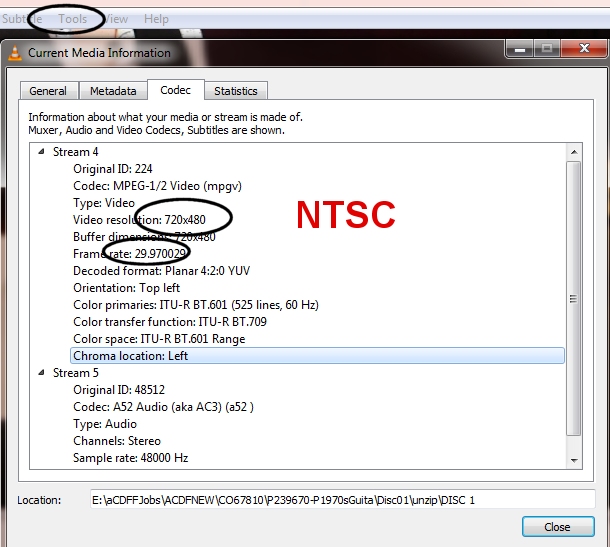
- Video resolution: 720x480 (480p)
- Frame rate: 29.97fps (roughly 30 frames per second)
- Open your .iso or VIDEO_TS folder with VLC media player and check under Tools-Codec and find this information. You may have to scroll down a while to find it.
- The following example is from an NTSC coded DVD.
- We author the DVD region free, but you have to pick the NTSC or PAL format which sets the resolution and frame rate. Some DVD players/TV systems may be able to play region free content, but not able to play PAL or NTSC format.
- Plays in North America and others: USA / Canada / Mexico / Japan / Sourth Korea / Central America DVD players and computers.
- Often, NTSC DVDs will play OK in other region DVD players and TV systems but there is no guarantee. e.g. It has been widely reported that many PAL DVD players and TVs can play NTSC DVDs.
- The DVD player and TV must be able to play the NTSC format.
- Compatible in USA / Canada / Mexico / Japan / Korea etc. More Info
PAL Format:
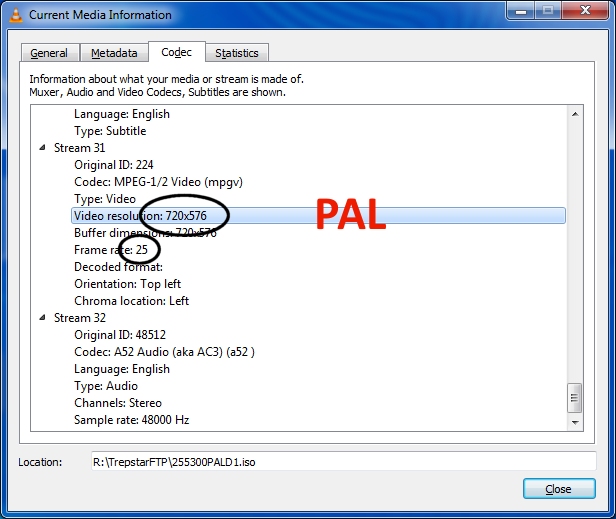
- Video resolution: 576i or 625 lines.
- Frame rate: 25 frames per second (fps)
- Open your .iso or VIDEO_TS folder with VLC media player and check under Tools-Codec and find this information. You may have to scroll down a while to find it.
- We author the DVD region free, but you have to pick the NTSC or PAL format which sets the resolution and frame rate. Some DVD players/TV systems may be able to play region free content, but not able to play PAL or NTSC format.
- Plays in most countries OTHER than USA/Canada.
- Most USA/Canada DVD players and TVs have trouble playing PAL DVDs.
- Compatible in Europe / UK / Most of EU / Australia / Argentina / Brazil / China / India etc. More Info
Source Video File Formats:
- We prefer to get source files in mp4 format. These should be compressed a reasonable amount. We don't accept more than 15GB of source files per DVD since it will not make the final video look any better if the original files are larger.
- We also accept .mov and .wmv, and .avi
- If you have a .m4v video convert it to mp4. As long is your .m4v does not have Apple's optional DRM-encryption, you can just rename the file extension to mp4. If it is encrypted, we can't accept the m4v because it's copy protected and we can't copy it.
DVD Authoring Basics and History
DVD authoring describes the process of creating a DVD video that can be played on a DVD player. DVD authoring software must conform to the specifications set by the DVD Forum group in 1995. The specifications are complicated due to the number of companies that were involved in creating them.
Strictly speaking, DVD authoring is a separate process from MPEG encoding, but most modern DVD authoring software have a built-in encoder (though separate encoders are still used when better quality or finer control over compression settings is required).
In addition, if your source video is HD - 1080p (1920x1090 pixels) or 4K (4096 x 2160 pixels), it is at higher resolution than a standard NTSC DVD which is (720x480). If you have very high resolution source material, you may not want to downgrade it to a DVD format. You may be looking for bluray authoring which is beyond the scope of this document. You may consider a USB Flash Drive product instead.
If you have the time, author the DVD yourself using the free open source DVD Styler